What to Ask Before Moving Off a Legacy Union Website Platform
A checklist for moving off a legacy union website platform while preserving domains, redirects, forms, files, member resources, SEO, and staff ownership.
Moving off a legacy union website platform can improve ownership, security, design, and member service. It can also break old URLs, forms, files, private resources, and staff habits if the project is rushed. The safest path starts with an inventory of content, domains, hosting, forms, redirects, files, member-only pages, analytics, and update responsibilities.
Use this guide to compare the topic against the records, permissions, reports, member-service paths, and staff workflows your union already uses.
Why This Decision Matters
This topic affects website migration, domains, hosting, redirects, forms, files, member-only resources, and staff ownership. A union can buy a tool that looks useful in a demo and still create extra work if the records, permissions, handoffs, reports, and ownership rules are not clear.
The strongest evaluation starts with the workflows members and staff already use. From there, the union can decide what should be kept, improved, retired, or moved into a safer operating path.
Start With the Source of Truth
The existing website inventory is the source of truth for migration. Include pages, posts, PDFs, forms, event links, member resources, redirects, media, DNS, analytics, and any private areas members still use.
What to Evaluate
Use these items as a first-pass requirements list before comparing screens or pricing.
- domain and DNS ownership
- current hosting, SSL, backups, and admin accounts
- page, file, and redirect inventory
- forms, notifications, and lead routing
- staff editing workflow after launch
Data and Workflow Risks
Most failures happen at the boundaries between tools, people, and records. Look for these risk signals before launch.
- old URLs returning 404 after launch
- public links to private files
- forms that stop notifying staff
- unknown vendor ownership of domains or credentials
- new design launched before content cleanup
Staff Ownership and Daily Use
Every workflow needs an owner. Decide who updates records, who reviews exceptions, who answers member questions, who handles support requests, and who signs off when the workflow changes.
If the vendor demo cannot show the staff path clearly, the union may end up with a tool that only works while one person remembers the workaround.
Reporting and Accountability
Migration reporting should show what moved, what redirected, what was archived, what still needs rewriting, and which forms or files need staff testing before launch.


Serving American Locals: Our platform is built to support unions across the United States, with U.S. locals operating on our U.S.-based systems to keep everything aligned with domestic operations and member needs.


Serving Canadian Locals: Canadian unions are supported through dedicated Canadian infrastructure, ensuring your local’s data, workflows, and member services remain inside Canada—built for Canadian unions, by a team that supports them every day.
Questions to Ask Vendors
Use the vendor conversation to prove fit, not just collect yes-or-no answers.
- Who owns the domain and hosting?
- Which old URLs still receive traffic?
- What forms must keep working?
- Which files should move into a portal?
- Who updates the new site after launch?
What to Bring to a Demo
A useful demo needs real examples. Bring enough context for the vendor to show how the workflow handles the union’s actual operating details.
- current sitemap
- top old URLs
- form list
- file library
- domain and hosting notes
Compliance and Risk Guardrails
Do not hide migration risk behind design language. The project should protect access, ownership, security, redirects, and records before the old platform is retired.
Data Protection and Hosting Questions
A software decision should also include where member data, payment context, private documents, staff notes, and reports are hosted. Ask whether the vendor can explain the hosting model, backup process, access controls, monitoring, and incident-response responsibilities in plain language.
For Union Impact, data protection is part of the operating workflow. The goal is to reduce loose spreadsheets, unmanaged file links, inbox-based records, and tool sprawl while keeping the union’s private records in a controlled environment.
Dedicated Infrastructure and Data Separation
Union Impact provides each client with a dedicated server environment. That means the union’s data is not co-mingled with another client’s software database.
Dedicated infrastructure makes the security boundary easier to understand, supports more predictable performance, and gives leadership a clearer answer when they ask how private union data is separated from other organizations.
U.S. and Canadian Data Residency
American client data is stored on servers within the United States. Canadian client data is hosted exclusively in Canadian data centers.
That does not replace the union’s own privacy, retention, or governance review, but it keeps data residency from being a vague answer during vendor evaluation.
Security Protocols to Confirm
A reliable partner should be able to describe current security protocols without forcing the union to guess. Confirm the practical controls before the launch decision is made.
- How are user roles and staff permissions assigned?
- How are backups created, retained, and restored?
- How are software updates and security patches handled?
- How are private files protected from public indexing?
- How are exports, offboarding, and administrator access controlled?
Permissions and Staff Access
The system should make it easy to separate daily staff work from officer review, finance access, communications access, member self-service, and administrator settings. Broad access may feel convenient during setup, but it creates avoidable risk after launch.
Define who can view, edit, export, delete, approve, publish, and report before the site or software goes live. The answer should match the union’s real roles rather than a generic business-user model.
Migration and Cleanup Plan
A clean launch depends on a clean migration plan. Inventory the old records, fields, files, forms, exports, reports, user accounts, permissions, and URLs that affect this workflow.
The union does not need to fix every historic issue before moving forward, but the project should identify duplicates, missing values, outdated files, unclear ownership, and records that need staff review instead of hiding those issues inside the import.
Member-Facing Communication
Members should understand what is changing, what is staying the same, where they should log in, how they can ask for help, and what information they may be asked to update.
Keep the language practical. A member does not need a vendor architecture explanation; they need to know how the new workflow affects payments, forms, notices, files, status, events, support, or whichever service path the union is changing.
Finance, Payment, and Reporting Impact
Even when a topic is not primarily financial, it may affect reports, payments, receipts, exports, dues status, refunds, event revenue, or staff reconciliation. Those connections should be mapped before launch.
Union Impact works best when payment status, member identity, files, reports, and staff exceptions are connected. That helps the union review the work by exception instead of rebuilding context from separate exports.


Our platform is hosted only in SOC 2 Type II / SOC 3 Type II–audited data centers, giving you a proven compliance baseline from day one.
Nightly Off-Site Backups
Your data is backed up automatically every night to a separate, secure data center—so you’re protected from accidental loss or hardware failures.
Security You Can Trust
Your connection to our system is encrypted with HTTPS (SSL/TLS) using 2048-bit certificates, ensuring your data stays private and tamper-resistant in transit.
Document and File Ownership
Private files should not live in random public links, personal drives, shared inboxes, or retired vendor folders. Decide which files belong inside member records, case records, private pages, staff-only folders, or public website pages.
File ownership matters during migration and after launch. The union should know who can upload files, who can remove them, who can see them, and how older versions are handled.
Portal, App, and Website Touchpoints
Many workflows touch more than one front door. A member may read a website notice, log into a portal, receive a message, submit a form, update a payment method, or ask staff for help.
The evaluation should identify which touchpoints are member-facing and which are staff-only. The stronger setup keeps the public experience simple while keeping the operating record complete behind the scenes.
Support After Launch
The first week after launch is not the end of the project. Staff may need help with member questions, missing records, permission adjustments, report changes, payment exceptions, form routing, and content updates.
Ask how support is handled after launch, who receives requests, what counts as included support, and how new workflow changes are prioritized.
What Not to Decide From a Demo Alone
A demo can show screens, but it cannot prove every operational detail unless the union brings real examples. Do not decide only from dashboard polish, generic feature names, or a vendor saying the system is flexible.
Decide from workflow proof: sample records, reports, permissions, forms, exports, files, member-facing steps, exceptions, and the support path staff will actually use.
Implementation Sequence
Use a phased sequence so staff can verify the workflow before the union depends on it in daily operations.
- Confirm source records and ownership.
- Map fields, files, permissions, and reports.
- Build the first workflow in the template.
- Test staff, officer, and member-facing paths.
- Review exceptions and cleanup needs.
- Launch with support and post-launch reporting.
Red Flags During Evaluation
Slow down if the vendor cannot answer basic operating questions or pushes the union toward a launch before the workflow is understood.
- No clear answer on data ownership or export rights.
- No explanation of hosting location or data separation.
- No plan for old URLs, files, records, or reports.
- No role-based permission model.
- No tested support path for staff after launch.
How Union Impact Helps
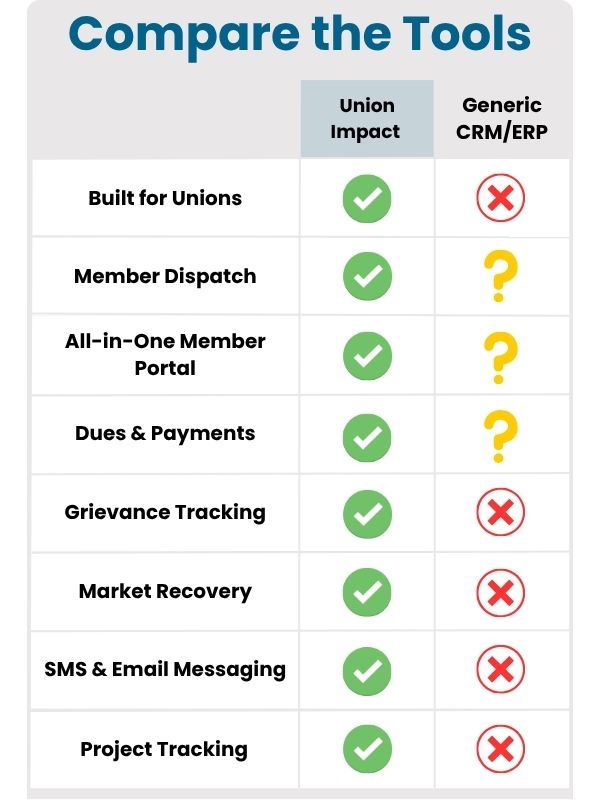
Union Impact is built around union operations rather than generic sales workflows. The system can connect websites, member records, communications, portals, files, payments, grievances, dispatch, reports, and staff support into one practical path.
The right setup depends on the union’s current tools, data quality, launch priorities, and staff capacity. The goal is to create a workflow that members can use and staff can maintain.
Final Readiness Checklist
Before publishing, launching, or switching vendors, confirm the basics in writing.
- The source records are identified.
- The migration plan is documented.
- The dedicated hosting and data-residency expectations are clear.
- The permission model matches staff roles.
- The member-facing steps are tested.
- The reporting and export needs are covered.
- The support path is understood by the people who will use it.


Dedicated Infrastructure: Your security is our priority. Every client receives their own dedicated server, meaning your data is never co-mingled with anyone else’s. This private environment ensures maximum security and performance.
Choose a reliable partner that follows the latest security protocols.
Ownership and Exit Rights
The union should be able to leave with its data, documents, reports, and essential operating history intact. Ask what export format is available, how much notice is needed, whether files are included, and how administrator access is handled during transition.
Good software should make the union more independent, not more dependent on one person, one vendor account, or one disconnected spreadsheet.
Related Union Impact Resources


Data Sovereignty Guaranteed: We are a U.S.-based company and store all American client data on servers within the United States.


To meet Canadian privacy laws: All Canadian client data is hosted exclusively in Canadian data centers.
Next Steps: Turn This Article Into Action
Use this article as a planning prompt, then compare the topic against the member records, staff workflows, reports, portals, files, and support paths your union already uses.
When you are ready to see how the work fits inside Union Impact, schedule a demo and bring the current forms, reports, exports, files, and workflow questions with you.
Recommended next clicks


For nearly two decades, we’ve been a trusted partner to union halls across North America.
Since 2006, our hands-on experience has given us a deep understanding of the unique challenges you face. We are proud to provide powerful, tailored solutions that solve those challenges and make a real impact on your operations.