Choosing the Best Union Management Software
A Complete Buyer's Guide Union leaders today are pulled in every direction. You're fighting off antiunion legislation, recruiting and
Union leaders today are pulled in every direction. You’re fighting off antiunion legislation, recruiting and retaining members in a changing labor market, and trying to deliver fast, professional service to the members you already represent.
Overview
Union leaders today are pulled in every direction.
1. What Is Union Management Software?
Union management software is an allinone system built to run the daytoday operations of a union, local, or labor association.
2.1 One Connected System Instead of Silos
When information is scattered across spreadsheets old Access databases paper files and staff inboxes Members get inconsistent answers Staff reenter the same data multiple times Reporting is painful.
2.2 Better Communication and Member Experience
Members expect the same kind of digital experience they get from banks, airlines, and utilities: fast, transparent, and available 24/7.
2.3 DataDriven Decisions
With modern software, leadership doesn’t have to guess.
2.4 Efficiency and Automation
The right system should remove busywork, not create more.
Serving American Locals: Our platform is built to support unions across the United States, with U.S. locals operating on our U.S.-based systems to keep everything aligned with domestic operations and member needs.
Serving Canadian Locals: Canadian unions are supported through dedicated Canadian infrastructure, ensuring your local’s data, workflows, and member services remain inside Canada—built for Canadian unions, by a team that supports them every day.
2.5 Compliance and Audit Readiness
Unions operate under strict reporting and recordkeeping requirements.
3. Essential Union Management Software Features (Checklist)
As you evaluate systems, mark each feature as: Musthave Nicetohave Not needed
3.1 Membership & Contact Management
Your member database should be the heart of the system.
3.2 Dues & Payment Management
Dues and finances are too critical to manage in spreadsheets.
3.3 Dispatch & Job Call Management
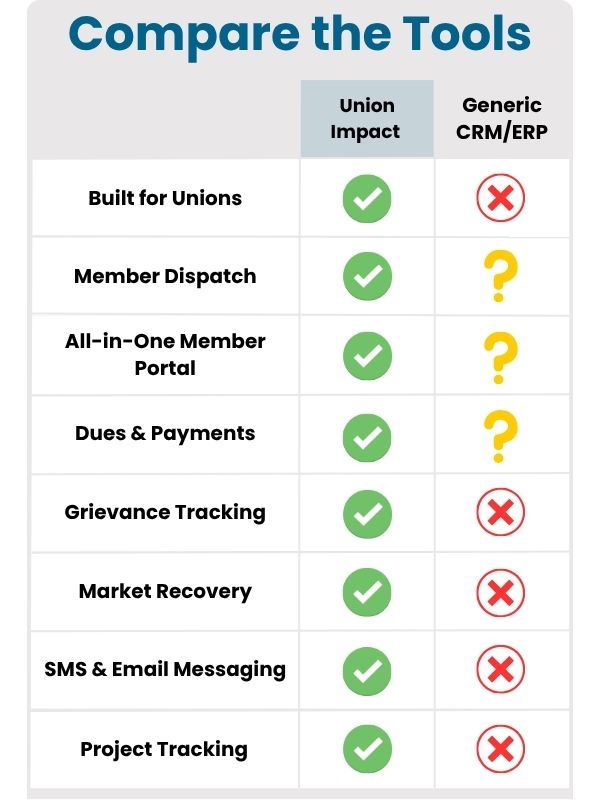
This is where generic CRM systems usually fail unions.
3.4 Grievance & Case Management
Losing track of one case can damage trust.
3.5 Organizing Tools
For unions growing membership and jurisdiction, organizing tools should be part of the platform-not a separate spreadsheet or app.
3.6 Member Communication & Engagement
Communication should come from the same system that holds member data.
3.7 Member Portals & Apps
Selfservice options save staff time and improve member satisfaction.
3.8 Events, Meetings, and Training
Most unions run a constant calendar of meetings, trainings, and rallies.
3.9 Reporting & Analytics
If the system can’t give you numbers when you need them, it’s not doing its job.
Our platform is hosted only in SOC 2 Type II / SOC 3 Type II–audited data centers, giving you a proven compliance baseline from day one.
Nightly Off-Site Backups
Your data is backed up automatically every night to a separate, secure data center—so you’re protected from accidental loss or hardware failures.
Security You Can Trust
Your connection to our system is encrypted with HTTPS (SSL/TLS) using 2048-bit certificates, ensuring your data stays private and tamper-resistant in transit.
3.10 Security, Hosting, and Compliance
To meet Canadian privacy laws: All Canadian client data is hosted exclusively in Canadian data centers.
4. Planning Your Union's Software Selection Process
The "best" software isn’t just about features-it’s about fit, cost, and risk.
Step 1: Document Pain Points and Goals
Bring together staff from membership, dispatch, finance, organizing, and leadership.
Step 2: Map Your Core Workflows
Before evaluating software, understand how you work now: How does someone become a member?
Step 3: Budget for Total Cost of Ownership (TCO)
License fees are only part of the cost.
Step 4: Evaluate Usability, Not Just Features
A system that checks every box on paper but is clunky to use will fail in practice.
Step 5: Confirm Scalability and Flexibility
Modular design: start with essentials, add modules as you grow Configurability: can you adapt fields, rules, and workflows without custom code?
Step 6: Ask About Integrations
Most unions already use Accounting or ERP systems Email calendar and file storage tools Website content management systems Your union software should either replace overlapping tools or integrate.
Dedicated Infrastructure: Your security is our priority. Every client receives their own dedicated server, meaning your data is never co-mingled with anyone else’s. This private environment ensures maximum security and performance.
Choose a reliable partner that follows the latest security protocols.
Step 7: Assess Vendor Support and Partnership
You’re not just buying software-you’re choosing a longterm partner.
Contact Us
If you have questions or need assistance, feel free to contact us.
Related Union Impact resources
Data Sovereignty Guaranteed: We are a U.S.-based company and store all American client data on servers within the United States.
To meet Canadian privacy laws: All Canadian client data is hosted exclusively in Canadian data centers.
Next Steps: Turn This Article Into Action
Use this article as a planning prompt, then compare the topic against the member records, staff workflows, reports, portals, and support paths your union already uses.
When you are ready to see how the work fits inside Union Impact, schedule a demo and bring the current forms, reports, exports, and workflow questions with you.
Recommended next clicks
For nearly two decades, we’ve been a trusted partner to union halls across North America.
Since 2006, our hands-on experience has given us a deep understanding of the unique challenges you face. We are proud to provide powerful, tailored solutions that solve those challenges and make a real impact on your operations.