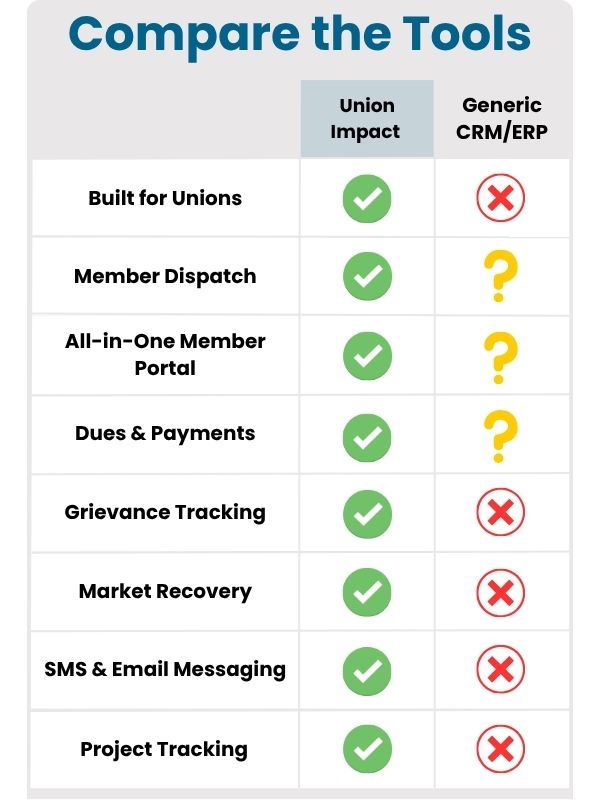
Questions to Ask Vendors
Use the vendor conversation to prove fit, not just collect yes-or-no answers.
- What rules determine list order or eligibility?
- How do members update availability?
- What certifications must be tracked?
- How are calls and outcomes recorded?
- What reports are required for review?
What to Bring to a Demo
A useful demo needs real examples. Bring enough context for the vendor to show how the workflow handles the union’s actual operating details.
- dispatch rules
- sample job calls
- current out-of-work list
- certification fields
- daily dispatch reports
Compliance and Risk Guardrails
Software should reflect the union’s dispatch rules and documentation needs. It should not invent rules, override the local process, or hide exceptions.
Data Protection and Hosting Questions
A software decision should also include where member data, payment context, private documents, staff notes, and reports are hosted. Ask whether the vendor can explain the hosting model, backup process, access controls, monitoring, and incident-response responsibilities in plain language.
For Union Impact, data protection is part of the operating workflow. The goal is to reduce loose spreadsheets, unmanaged file links, inbox-based records, and tool sprawl while keeping the union’s private records in a controlled environment.
Dedicated Infrastructure and Data Separation
Union Impact provides each client with a dedicated server environment. That means the union’s data is not co-mingled with another client’s software database.
Dedicated infrastructure makes the security boundary easier to understand, supports more predictable performance, and gives leadership a clearer answer when they ask how private union data is separated from other organizations.
U.S. and Canadian Data Residency
American client data is stored on servers within the United States. Canadian client data is hosted exclusively in Canadian data centers.
That does not replace the union’s own privacy, retention, or governance review, but it keeps data residency from being a vague answer during vendor evaluation.
Security Protocols to Confirm
A reliable partner should be able to describe current security protocols without forcing the union to guess. Confirm the practical controls before the launch decision is made.
- How are user roles and staff permissions assigned?
- How are backups created, retained, and restored?
- How are software updates and security patches handled?
- How are private files protected from public indexing?
- How are exports, offboarding, and administrator access controlled?
Permissions and Staff Access
The system should make it easy to separate daily staff work from officer review, finance access, communications access, member self-service, and administrator settings. Broad access may feel convenient during setup, but it creates avoidable risk after launch.
Define who can view, edit, export, delete, approve, publish, and report before the site or software goes live. The answer should match the union’s real roles rather than a generic business-user model.
Migration and Cleanup Plan
A clean launch depends on a clean migration plan. Inventory the old records, fields, files, forms, exports, reports, user accounts, permissions, and URLs that affect this workflow.
The union does not need to fix every historic issue before moving forward, but the project should identify duplicates, missing values, outdated files, unclear ownership, and records that need staff review instead of hiding those issues inside the import.
Member-Facing Communication
Members should understand what is changing, what is staying the same, where they should log in, how they can ask for help, and what information they may be asked to update.
Keep the language practical. A member does not need a vendor architecture explanation; they need to know how the new workflow affects payments, forms, notices, files, status, events, support, or whichever service path the union is changing.
Finance, Payment, and Reporting Impact
Even when a topic is not primarily financial, it may affect reports, payments, receipts, exports, dues status, refunds, event revenue, or staff reconciliation. Those connections should be mapped before launch.
Union Impact works best when payment status, member identity, files, reports, and staff exceptions are connected. That helps the union review the work by exception instead of rebuilding context from separate exports.